

How to install ClockworkMod Recovery on the Orange San Francisco II / ZTE Crescent
Page 3 of 5 - How to debrand / install a custom ROM / Android 4.0 from scratch on the Orange San Francisco II
Introduction » Install the USB drivers » Install ClockworkMod Recovery » Choose and install a ROM » Comments
You need to install ClockworkMod Recovery before you can install a custom ROM. With ClockworkMod Recovery, you can install, backup and restore a ROM. Before following the instructions on this page, make sure you have installed the USB drivers (not required for Mac or Linux)
Instructions for Windows
- Open Settings from the app list on your phone.
- Tap Applications.
- Tap Development.
- Make sure USB debugging is ticked.
- Tap OK.
- With your phone on, connect it to your computer (use the cable included with your phone).
- Download osf-ii-windows.zip (click to download) and extract anywhere.
- Once extracted, open the osf-ii-windows folder.
- Double click on clockinstall (or clockinstall.bat)
- Within a few seconds, your phone will reboot, and a green Android logo will appear. The whole process may take up to 10 minutes. During < waiting for device >, Windows may attempt to download and install a driver. This may take a few additional minutes.
- Once completed, your phone will reboot and turn on to its normal state. On your computer, you should see Press any key to continue . . . You may close the window safely.
- ClockworkMod Recovery should now be installed on your phone, and you can continue to the next page to install a custom ROM.
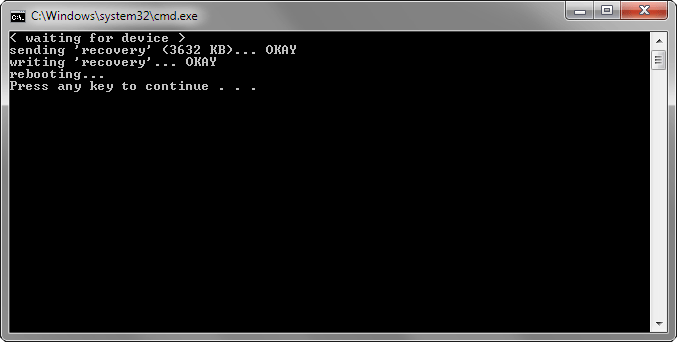
ClockworkMod Recovery successfully installed on the Oranage San Francisco II / ZTE Crescent. You may close the window.
Instructions for Mac
- Open Settings from the app list on your phone.
- Tap Applications.
- Tap Development.
- Make sure USB debugging is ticked.
- Tap OK.
- With your phone on, connect it to your computer (use the cable included with your phone).
- Download osf-ii-mac.zip (click to download) and extract anywhere.
- On your computer, open Terminal (Applications -> Utilities -> Terminal) and point to the folder osf-ii-mac.
- Enter the following commands:
- Within a few seconds, your phone will reboot, and a green Android logo will appear. The whole process may take up to 10 minutes.
- Once completed, your phone will reboot and turn on to its normal state.
- You have now installed ClockworkMod Recovery, and you can continue to the next page to install a custom ROM.
chmod +x clockinstall.sh
./clockinstall.sh
Instructions for Linux
- Open Settings from the app list on your phone.
- Tap Applications.
- Tap Development.
- Make sure USB debugging is ticked.
- Tap OK.
- With your phone on, connect it to your computer (use the cable included with your phone).
- Download osf-ii-linux.zip (click to download) and extract anywhere.
- On your computer, open Terminal (Applications -> Utilities -> Terminal) and point to the folder osf-ii-linux.
- Enter the following commands:
- Within a few seconds, your phone will reboot, and a green Android logo will appear. The whole process may take up to 10 minutes.
- Once completed, your phone will reboot and turn on to its normal state.
- You have now installed ClockworkMod Recovery, and you can continue to the next page to install a custom ROM.
chmod +x clockinstall.sh
sudo ./clockinstall.sh

How to debrand / Install Custom ROMs / Android 4.0 from scratch
- 1. Introduction
- 2. Install the USB drivers
- 3. How to install ClockworkMod Recovery
- 4. How to choose and install a ROM
- 5. Comments
Popular Guides, Tutorials & Articles

How To Install Custom ROMs / Android 2.3 / Android 4.0 from scratch
- 1. Introduction
- 2. How to identify Gen 1 or Gen 2
- 3. How to root and install ClockworkMod Recovery
- 4. How to choose and install a ROM
- 5. Comments
Popular Guides, Tutorials & Articles
- How to unlock Orange San Francisco for free
- List of ROMs (updated regularly)
- An Introduction to the Orange San Francisco / ZTE Blade / ZTE Libra U-V880
- Why should I install a Custom ROM?
- What is rooting?
- What is ClockworkMod Recovery?
Other Guides, Tutorials & Articles